Moodle Tutorials for Students
How to Login and Edit Your Profile
How to Check Assignments
How to Post Discussion in Forum
How to Upload Assignments
How to Delete and Re-Upload Assignments
How to Download Files in Moodle
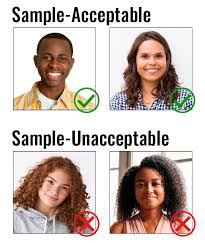
Please Upload your ID picture.
Photo requirement:
- completely visible
- free of any obstructions
- a neutral expression
Steps for checking Safe Exam Browser on your laptop:
1. Download the SEB configuration file on your laptop
2. Run .seb file, wait for teacher to input "Access Code"
3. Click " Device Diagnostic Check" on the bottom right corner, follow the instruction, until click 'Submit" button.
This test is adopted from Columbia University and is designed to educate students about plagiarism.
Please note that this is compulsory!
Students have 3 attempts for the test. Your highest score will be recorded.